
I faced a particular problem, a client specifically required a mobile auth almost every hour to receive notifications. This android app basically scanned a QR shown on the website, to prove presence. It quickly became very annoying as it meant I had to pickup my phone every hour to scan this QR.
I knew that it surely wasn't using Webauthn or any complex protocols, so I was pretty sure that this could be solved without a hitch, if i wireshark and mitm-ed the app.
How do I MITM was the next question. Well I'll detail it out clearly below, since I found this is quite vague on what to do.
Prerequisites
First things first, you will require adb throughout this process. Enable it, if you don't know what adb is, you probably shouldn't proceed with any further steps listed below. Commands for certain obvious things will be omitted for brevity.
Make sure you have:
NodeJS 24 (tested only with that, might work with older or newer versions, YMMV)
mitmproxy https://www.mitmproxy.org/
ADB
Preparing the APK
Check if the app is a split app, this should be quite trivial
adb shell pm list packages | grep <app_name>
adb shell pm path <package_id>
If so, you will need to install this app your phone that has the app that needs to be analyzed: https://github.com/AbdurazaaqMohammed/AntiSplit-M
Once installed on your phone, proceed to open it, select the app that's supposed to be put through the MITM.
This will create a single apk instead of the split apks. Proceed to pull that generated apk since we need to patch it for MITM.
We need to create a package with ability for mitmproxy to work. The patch we do, enables the app to trust user-installed CA certificates, looks for possible certificate-pinning and patches it. This is very important since the mitmproxy relies on user-installed CA certificates on android. Android doesn't allow apps to trust any user-installed CA certificate unless the app explicitly allows it. This might not work in case an app has more sophisticated certificate pinning, in which case, you are probably on your own.
npx apk-mitm package_antisplit.apk
Now uninstall the existing app, and go ahead and install the patched variant which has a suffix _patched.apk. You will not be able to install it over the previous app, since the signature will never match the original. Do note this means, you will have to go through the onboarding, logging in, and all the steps necessary post a reinstall.
Setting Up mitmproxy
Proceed to run mitmweb command
This should open a browser with localhost:8081 and show up a screen like this.
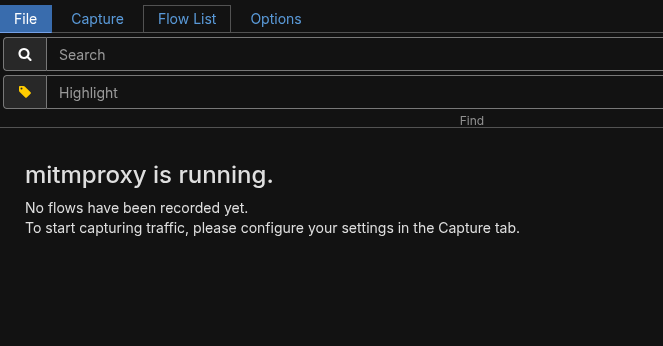
This means mitmproxy is functional, and ready to intercept traffic. Let's now prepare the phone for the same. Connect your phone to the same network, and ensure node isolation isn't on, for this network. It simply won't work with node isolation. Node or AP isolation prevents 2 clients from communicating with one another. It is usually a security feature that is implemented in most public WiFi AP.
Configuring the Phone
I hold a Pixel, so you should be able to replicate the exact options on another stock android, but if you are on skins like OneUI, HyperOS YMMV.
Open settings > Network & Internet > Internet > Tap the gear beside the wifi name, go to network details, and tap on the top right pencil-like edit button. That should take you to proxy settings.
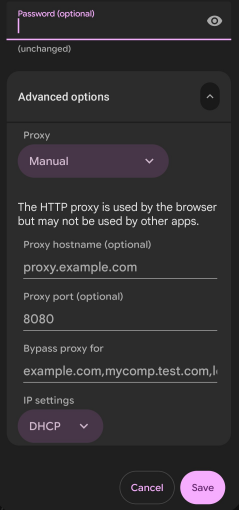
Enter the proxy hostname as your PC IP that runs the mitmweb, port as 8080 and save it. Do note, while the webui for the proxy runs on 8081, the actual proxy runs on port 8080.
Visit http://mitm.it on your phone after this. It should prompt you to install the CA certificate for your phone. If it doesn't, your proxy setup is likely not functional, or not properly configured, go back and check the previous steps. If it does, install it, and goto Settings > Settings & Privacy > More Security & Privacy > Encryption & Credentials > Install a certificate, and point it to the file downloaded. You would also notice that your device starts crying that it doesn't have internet, this is normal, and can be ignored safely.
What Now
Now you should be able to open the app that needs to be analyzed through mitm, and all the requests should be instantly captured on your pc.
However, do note you may not be able to reverse-engineer everything the app does with this. It likely needs to be combined with a decompile of the app, using possibly jadx/apktool to understand what the app does besides just the network requests.
Closing Thoughts
I managed to replicate all the requests from the android app, and build a browser extension quite quickly with the requests that were pulled from the MITM attack. The harder part turned out to be figuring out how to understand the token that was generated with each request, which I managed to, with apktool decompiling. All-in-all a quite simple task, I simply wanted to document here, since the prevailing documentation/articles on how to do this were quite vague.